Streamline Your Workflow: Leveraging GitHub Copilot for Smarter Pull Requests and Code Reviews

We’ve all been there: staring at a complex pull request (PR), trying to craft the perfect description that captures weeks of work, or wading through code reviews, catching the same minor issues repeatedly. In the fast-paced world of modern software development, the demand for both speed and quality is relentless. Traditional pull request and code review processes, while essential, can often feel like bottlenecks, consuming valuable developer time.

Enter GitHub Copilot. While widely known for its impressive code completion capabilities, Copilot is evolving into a more integrated assistant within the entire GitHub workflow. It’s extending its reach to tackle some of the friction points in collaboration, specifically offering features to enhance Pull Requests and Code Reviews. These GitHub Copilot features aim to improve efficiency, clarity, and even code security.

This article explores how you can leverage GitHub Copilot for smarter Pull Requests and Code Reviews. We’ll examine the capabilities of the Copilot PR Summary Generator and the emerging AI Code Review functions, grounding our discussion in official GitHub documentation to see how these tools can potentially transform your development cycle, while also highlighting the importance of responsible usage.

Automating Pull Request Descriptions with Copilot

Writing clear, concise, and informative pull request descriptions is crucial for effective team collaboration and code maintainability. However, it’s often seen as a chore that takes time away from coding. Inconsistent or missing descriptions can slow down reviewers who need to decipher the changes themselves. This is where GitHub Copilot steps in to offer assistance with its Copilot Pull Request summary feature.

Copilot can automatically generate a summary for your pull request, aiming to provide a high-level overview and details of the code modifications [1]. This generation can happen automatically when a PR is created if enabled by repository or organization administrators, or it can be triggered manually by the developer. Manual triggers can be done by clicking the Copilot icon [1]. The generated content typically includes a brief overview followed by bullet points detailing specific changes [1]. This ability to automate PR summary creation represents a significant step towards reducing friction in the PR process.

While this automation offers clear benefits – saving developer time, promoting consistency in descriptions, and helping reviewers get up to speed faster – it comes with a critical caveat. The generated summaries are *suggestions*, not definitive descriptions. It is absolutely essential, as emphasized by GitHub’s own guidelines, that developers meticulously review, edit, and take ownership of the summary before publishing the PR [2]. Over-reliance without careful verification can lead to inaccurate or misleading information, undermining the very purpose of the description [2]. Think of it as a helpful first draft, requiring your expertise to finalize.

Augmenting Code Reviews with Copilot

Code reviews are a cornerstone of building high-quality, secure software. They catch bugs, enforce standards, and facilitate knowledge sharing. However, manual reviews can be time-consuming, especially when identifying common vulnerabilities or boilerplate errors. Valuable human reviewer time is often better spent on analyzing complex logic, architectural decisions, and nuanced business requirements. GitHub Copilot aims to alleviate some of this burden with its Copilot Code Review feature.

Findings from Copilot Code Review are presented as comments directly within the PR’s “Files changed” view. These comments typically highlight the vulnerability type, pinpoint the affected code location, and often include a suggested fix [3]. The potential benefits are clear: catching common security mistakes early in the development cycle, freeing up human reviewers to focus on higher-level concerns, and potentially improving the overall security posture of the codebase. However, it’s crucial to remember that this AI Code Review tool is designed to *augment*, not replace, human review [3]. It may not catch all vulnerabilities, especially complex or context-dependent ones, and human judgment remains indispensable for ensuring correctness, security, and alignment with project goals [3].

Integrating Copilot into Your Team’s Workflow

The real power of these GitHub Copilot features emerges when they work in synergy within your team’s development process. A well-generated (and developer-verified) PR summary provides immediate context, allowing reviewers – both human and AI – to understand the changes more quickly. Subsequently, Copilot Code Review can handle an initial pass for common security issues, reducing the burden on human reviewers and allowing them to focus their expertise more effectively. This combination promises a smoother, faster, and potentially more secure path from code commit to merge.

Implementing these tools effectively requires thoughtful integration. It’s vital to establish clear team expectations regarding the review and validation of *all* Copilot-generated output, whether it’s a PR summary or a code review comment. Emphasize that these are AI developer tools designed to assist, and human oversight remains paramount. Providing feedback to GitHub, especially for features in beta like Copilot Code Review, can also help shape their future development.

While the potential benefits are exciting, it’s important to address potential concerns proactively. Teams should be mindful of the risk of over-reliance on AI suggestions and the inherent limitations of current AI technology. Reinforce the message that Copilot is an assistant; critical thinking, domain knowledge, and ultimate responsibility still lie with the development team. Open discussion about how best to leverage these tools while maintaining high standards of quality and security is key.

Conclusion: Your AI Assistant for Enhanced Workflows

GitHub Copilot is rapidly expanding beyond code completion, offering intelligent assistance directly within the core pull request and code review workflows. By leveraging Copilot Pull Request summaries, developers can save time and improve the consistency of their PR descriptions, provided they diligently review and refine the AI’s suggestions [1, 2]. Similarly, the Copilot Code Review feature (currently in beta for Enterprise users) offers a promising way to perform initial security checks, catching common vulnerabilities early and augmenting the crucial work of human reviewers [3].

The key takeaway is that GitHub Copilot, when used responsibly, can be a powerful force multiplier for development teams. It’s not about replacing developers or reviewers but enhancing their capabilities, automating repetitive tasks, and freeing up cognitive load for more complex problem-solving. These tools help streamline processes, potentially leading to faster development cycles and improved secure code review practices.

As AI continues to evolve, its integration into developer workflows will likely deepen. Embracing tools like GitHub Copilot thoughtfully allows teams to stay ahead of the curve. We encourage you to explore these features if they are available on your GitHub plan (check Copilot Business/Enterprise availability). Experiment, see how they fit your team’s needs, and remember the golden rule: AI assists, humans decide.

References

Weekly Article News #38

The recommended articles the author has read this week.
This letter is posted every Monday.

Announcing PyCaret 3.0 — An open-source, low-code machine learning library in Python

This is long-awaited news. The PyCaret 3.0, a low-code machine learning library, was released! The main features of this version are as follows:

  • Stable support of the Time Series Forecasting module
  • Object Oriented API in experiments. We can create an experiment instance of each call of the setup() function.

TabPFN

The TabPFN is an AutoML python library to construct a Neural-Network-based model on a tabular dataset. The most characteristic feature is that the algorithm is based on Transformer.

Note that the TabPFN supports just classification problems.

I have gotten the impression that the AutoML Python library is evolving more and more.

Weekly Article News #37

The recommended articles the author has read this week.
This letter is posted every Monday.

This week, the author introduces the OSS for managing pipelines. And, also introduce one article.

Apache Airflow

Airflow is a platform, created by Airbnb, to programmatically author, schedule, and monitor workflows. We can manage to schedule and monitor the workflow for data and machine learning pipelines.

Introduction to Apache Airflow

This article introduces the usage of Airflow and comparison with other alternatives. We can check the features and their differences.

Weekly Article News #36

The recommended articles the author has read this week.
This letter is posted every Monday.

PyTorch 2.0

Big news! There was an announcement of the future release of PyTorch 2.0. The first stable version will be released in early March 2023.

Surprisingly, PyTorch 2.0 is backward compatible with PyTorch 1.0. This is because the features of PyTorch 2.0 are new additive features. One of the crucial features is torch.compile. This function accelerates the performance of PyTorch, especially in GPU calculations.

The author can’t wait for it to be released!

Algorithms #2 – Is a Prime Number?

The algorithm is necessary for a coding interview for a data scientist and a software engineering job. This article’s topic is one of the most important subjects.

Problem

Write a function to judge if a number is prime, where a prime number is a natural number greater than or equal to 2, whose positive divisor is 1 and itself. The function returns True if the number is prime, or returns False otherwise.

Solution

This solution is a simple approach without any specific mathematical knowledges. The approach consists three steps as follows.

  1. Check the special case.
    From the definition of a prime number, 1 is NOT a prime number. And, 2 is the only prime number among even numbers.
  2. An even number is NOT a prime number.
  3. Judge against odd numbers.
    In turn, we will check the condition if a number exists whose remainder is zero, it is not a prime number. Note that, using prior knowledge that the number is not even, it is sufficient to examine only odd numbers.
def is_prime(num):
    # check the special case,
    # 1 is NOT a prime number,
    # the only prime number 2 in even numbers.
    if num <= 1:
        return False
    elif num == 2:
        return True
    
    # even number is a False case
    if num % 2 == 0:
        return False

    # Only checking on odd numbers is sufficient.
    for i in range(3, num, 2):
        if num % i == 0:
            return False
    return True

Test examples

nums = list(range(2, 15))
for n in nums:
    print(f"{n}: {is_prime(n)}")

>  2: True
>  3: True
>  4: False
>  5: True
>  6: False
>  7: True
>  8: False
>  9: False
>  10: False
>  11: True
>  12: False
>  13: True
>  14: False

As a comment, using mathematical knowledge of integers, it is also possible to implement a solution with a more efficient computational complexity.

Weekly Article News #35

The recommended articles the author has read this week.
This letter is posted every Monday.

This week, the author introduces the OSS for Astronomy, SunPy.

SunPy

Python library to access the data for solar physics. Therefore, we can easily visualize planet positions in the solar system by utilizing SunPy.

Recently, the author posted an article on how to use SunPy to visualize planet positions. Just a quick glance, when you have an interest.
Article Link

SunPy – Planet Positions in the Solar System

SunPy is a useful python library to access solar physics data. Therefore, we can easily visualize planet positions in the solar system by utilizing SunPy.

In this post, we will quickly see how to visualize the orbits of specified planets in a specified time series.

This post assumes the use of a Jupyter notebook.

The full code link of Google Colab

Install SunPy and Astropy

Before analysis, we have to install SunPy if you did not install it yet. We can easily install it with a pip command. If you use an anaconda environment, please use conda commands.

$ pip install sunpy

In this post, the version of SunPy is 3.1.8.

In addition to SunPy, we use data structures of Astoropy, a common-core python package for Astronomy.

$ pip install astropy

In this post, the version of Astropy is 4.3.1.

Import libraries

First, we import the necessary libraries.

import matplotlib.pyplot as plt
import numpy as np
import pandas as pd

from astropy.coordinates import SkyCoord
from astropy.time import Time
from sunpy.coordinates import get_body_heliographic_stonyhurst

Quick Try

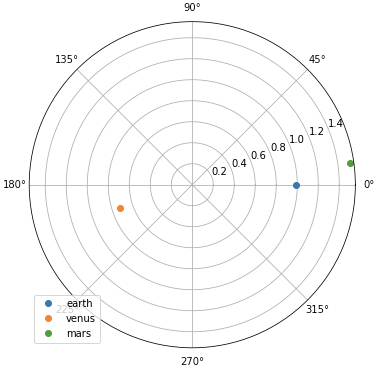
Let’s try SunPy with a quick view. We have to specify the planets and the time series as the “Time” type of Astropy. Then, we can get each coordinate by using the function “get_body_heliographic_stonyhurst()” of SunPy.

Note that the coordinate system is NOT the cartesian coordinate. We can get them as latitude, longitude, and radius. And, the units are degree and AU. Au is the distance unit, where 1 AU is the distance between Earth and Sun().

obstime = Time('2022-11-22T07:54:00.005')
planet_list = ['earth', 'venus', 'mars']
planet_coord = [get_body_heliographic_stonyhurst(this_planet, time=obstime) for this_planet in planet_list]

We can visualize them as follows.

fig = plt.figure(figsize=(6, 6))
ax1 = plt.subplot(1, 1, 1, projection='polar')
for this_planet, this_coord in zip(planet_list, planet_coord):
    plt.plot(np.deg2rad(this_coord.lon), this_coord.radius, 'o', label=this_planet)
plt.legend(loc='lower left')
plt.show()

Obtain the Orbit Information of the Planets in the Solar System

We will prepare the practical functions to visualize the orbits of specified planets in a specified time series.

First, we define a function to get a list of coordinate information instances for a specified planet at a specified time.

def get_planet_coord_list(timestamp, planet_list):
    """
    Get a list of coordinate information instances 
    for a specified planet at a specified time
    """
    # convert into the Time type of astropy
    timestamp = Time(timestamp)
    
    # get a coordinate of a specified planet
    planet_coord_list = [get_body_heliographic_stonyhurst(_planet, time=timestamp) for _planet in planet_list]

    return planet_coord_list

Second, we define a function to get coordinates of specified time and planets. In this function, we use the function get_planet_coord_list() defined above.

def get_planet_coord(timestamp, planet_list):
    """
    Get coordinates of specified time and planet

    Return: dict
        key(str): planet name
        value(dict): latitude(deg), longitude(deg), radius(AU)
            key: 'lon', 'lat', 'radius'
    """
    # a list of coordinate information instances
    # for a specified planet at a specified time
    _planet_coord_list = get_planet_coord_list(timestamp, planet_list)

    dict_planet_coord = {}
    for _planet, _coord in zip(planet_list, _planet_coord_list):
        # latitude(deg), longitude(deg), radius(AU)
        lon, lat, radius = _coord.lon, _coord.lat, _coord.radius
        # dict_planet_coord[_planet] = [lon, lat, radius]
        dict_planet_coord[_planet] = {'lon':lon, 'lat':lat, 'radius':radius}
    
    return dict_planet_coord

Third, we define a function to get the coordinates of a specified planet in a specified time series. By obtaining the coordinates for the time series, we can plot the orbit at the specified period. And, in this function, we use the function get_planet_coord() defined above.

def get_planet_coord_timeseries(timeseries, planet_list):
    """
    Get coordinates of a specified planet in a specified time series
    """
    # initialization
    dict_planet_coord_timeseries = {}
    for _planet in planet_list:
        dict_planet_coord_timeseries[_planet] = {'lon':[], 'lat':[], 'radius':[]}
    
    # Obtain coordinates of each planet in time series
    for _timestamp in timeseries:
        """
        Coordinates of the specified planet at the specified time
        
        key(str): planet name
        value(dict): latitude(deg), longitude(deg), radius(AU)
            key: 'lon', 'lat', 'radius'
        """
        dict_planet_coord = get_planet_coord(_timestamp, planet_list)
        for _planet in planet_list:
            for _key in ['lon', 'lat', 'radius']:
                dict_planet_coord_timeseries[_planet][_key].append(np.array(dict_planet_coord[_planet][_key]))

    # Convert list into ndarray
    for _planet in planet_list:
        for _key in ['lon', 'lat', 'radius']:
            dict_planet_coord_timeseries[_planet][_key] = np.array(dict_planet_coord_timeseries[_planet][_key])
    
    return dict_planet_coord_timeseries

Now all information on planetary orbits can be obtained. Now let’s actually plot the orbits of the planets.

Visualization of the Orbits of the Planets in the Solar System

To visualize the planetary orbits more easily, we will define the plot function. The argument of this function is the return of the function get_planet_coord_timeseries() define above.

def plot_planet_position(dict_planet_coord_timeseries):
    fig = plt.figure(figsize=(8, 8))
    ax = plt.subplot(1, 1, 1, projection='polar')
    for _planet in dict_planet_coord_timeseries.keys():
        # longitude(deg), radius(AU)
        lon = np.deg2rad(dict_planet_coord_timeseries[_planet]['lon'])
        radius = dict_planet_coord_timeseries[_planet]['radius']
        # plot
        plt.plot(lon, radius, label=_planet, linewidth=2)
        plt.scatter(lon[0], radius[0], color='black', s=40)  # initial point
        plt.scatter(lon[-1], radius[-1], color='red', s=40)  # final point
    plt.legend()
    plt.show()
    plt.close(fig)

Then, let’s plot the orbits!

Using the functions you have defined so far, you can easily draw orbits for a given planet and period of time. The information to be pre-specified is the period of the target data (start and end) and the planets of the solar system.

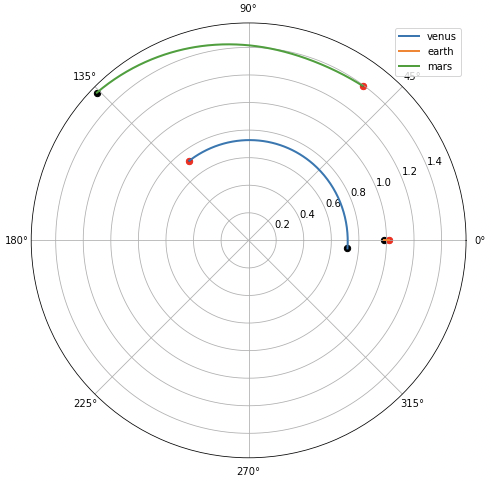
First, let’s specify a near-Earth planet. Set the period appropriately. The author encourages readers to try changing it in various ways.

start, end = '2022-01-01', '2022-08-01'
planet_list = ['venus', 'earth', 'mars']

timeseries = pd.date_range(start, end, freq='D')
dict_planet_coord_timeseries = get_planet_coord_timeseries(timeseries, planet_list)
plot_planet_position(dict_planet_coord_timeseries)

Note that the graph is in a coordinate system with the earth as the stationary system in the angular direction. Therefore, the position of the earth appears to be motionless, except in the radial direction. The change of the earth in the radial direction is due to the fact that the Earth’s orbit is not strictly circular, but elliptical.

Next, we will include planets far from Earth.

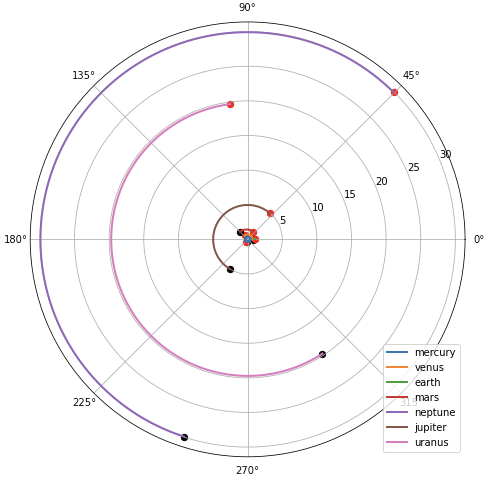
planet_list = ['mercury', 'venus', 'earth', 'mars', 'neptune', 'jupiter', 'uranus']
dict_planet_coord_timeseries = get_planet_coord_timeseries(timeseries, planet_list)

plot_planet_position(dict_planet_coord_timeseries)

Planetary orbits around the Earth can be seen to be quite dense. In this way, the structure of the solar system can be visually confirmed.

Summary

We have seen how to visualize the orbits of specified planets in a specified time series by SunPy. With SunPy, any Python user can check the orbits of the planets of the solar system.

The author hopes this blog helps readers a little.

Algorithms #1 – Two Sum Function

The algorithm is necessary for a coding interview for a data scientist and a software engineering job. This article’s topic is one of the most important subjects.

Problem

Write a function to return True if there exists a pair of numbers whose summation equals the given target number, or to return False otherwise. You may assume that an element in a list is an integer.

Solution – Normal Approach

This solution is a simple approach, but not a computationally efficient method. Time Complexity is $O(N^2)$.

The method examines all the sums of two list elements in sequence to determine if they contain the desired result.

def two_sum(nums, target):
    """
    Time Complexity O(N^2)

    Args:
        nums(list): a list of an integer number
        target(int): target-integer number
    """
    for i in range(len(nums)):
        for j in range(len(nums)):
            if i != j and target == nums[i] + nums[j]:
                return True
    return False

Test examples

assert two_sum([10, 2, 3, 1], 5) == True
assert two_sum([1, 2, 3, 4], 1) == False

Solution – Better Approach

This solution is an improved approach, then the Time Complexity is $O(N)$!

The key concept is as follows. First, we choose one element in each iteration. As a result, we can determine the desired element from the “target number – one element”. Second, we check whether the desired element exists in a cache, where the cache is a list containing elements examined in iterations already performed.

By repeating the above procedures, it is possible to determine whether a desired pair of elements is included in the list.

def two_sum(nums, target):
    """
    Time Complexity O(N)

    Args:
        nums(list): a list of an integer number
        target(int): target-integer number
    """
    cache = set()
    for n in nums:
        ans = target - n
        if ans in cache:
            return True
        else:
            cache.add(n)
    return False

Test examples

assert two_sum([10, 2, 3, 1], 5) == True
assert two_sum([1, 2, 3, 4], 1) == False

Appendix: The case that the indices of numbers are required

Problem

Write a function to return the indices of the two numbers whose summation equals the given target number, or to return False otherwise. You may assume that an element in a list is an integer.

Solution

In this case, we should use a hash map, i.e., the dictionary in Python. The concept of a solution is the same as above. However, we have to store the indices of each number.

def two_sum(nums, target):
    cache = {}
    for i, n in enumerate(nums):
        ans = target - n
        if ans in cache:
            return (cache[i], i)
        else:
            cache[n] = i
    return False

Test examples

assert two_sum([10, 2, 3, 1], 5) == (1, 2)
assert two_sum([1, 2, 3, 4], 1) == False

Weekly Article News #34

The recommended articles the author has read this week.
This letter is posted every Monday.

This week, the author introduces two practical OSS to perform Bayesian Optimization.

BoTorch

A python library for Bayesian Optimization accelerated by PyTorch. This OSS is worth to be paid attention although it is currently in beta and under active development.

Optuna

One of the most famous python libraries for Bayesian Optimization, developed by Preferred Networks, Inc. We can use it with flexibility, fast execution, and easy parallelization.

BayesianOptimization

This GitHub repository (a python library) is also educational and worth reading, where the algorithm is implemented based on the Gaussian Process.

Weekly Article News #33

The recommended articles the author has read this week.
This letter is posted every Monday.

This week, the author introduces two practical OSS to check the fairness of a machine learning model, e. g. a model is unwillingly biased toward certain information.

Themis ML

A python library to check the fairness. And, this library is built on top of pandas and scikit-learn, so it is expected user friendly.

AI Fairness 360 (AIF360)

A python and R library containing methods for checking fairness.