

Lambda Function for Python Beginners

A lambda function may be unfamiliar with Python beginners. Certainly, the lambda function is not always necessary, but if it is used adequately, it will be possible to execute arbitrary processing with a compact description.

What is a lambda function? Main two features are as follows.

1. Anonymous function with a return value
2. Described with one sentence

Let’s start with a simple example to imagine!
We will see two example codes as follows. And, note that both examples have the same function, returning the square of the input variable.

Standard Style

This example is the one you might be familiar with.

def square(x):
    return x*x

ret = square(2)
print(ret)

>> 4

Lambda function Style

With a lambda-function style, you can express the same function above with just one sentence!

ret = (lambda x: x*x)(2)
print(ret)

>> 4

The syntax of lambda functions is below.

Syntax:    lambda x: f(x)

“lambda” just claims that “This is a function”. And, the function is “f(x)” with the argument “x”, equaling to the returned value.

Since the whole sentence “lambda x: f(x)” is the function itself, we use parentheses for giving an argument to x as in the above example.

Example

Let’s square each element of the list.

A standard expression by “for loop” is as follows.

num_list = [1, 2, 3, 4]
for i in range(len(num_list)):
    num_list[i] = num_list[i]*num_list[i]
print(num_list)

>> [1, 4, 9, 16]

On the other hand, we can rewrite “for loop” into the one sentence with lambda functions.

num_list = [1, 2, 3, 4]
list( map(lambda x: x*x, num_list) )

print(num_list)

>> [1, 4, 9, 16]

map() function is to perform the same processing for each element of list.

Syntax:    map(function, iterator)

You can interpret “function” and “iterator” as just like “f(x)” and “x”, respectively.

Actually, there is a deep world of map() function, so the details of an explanation will NOT be here. However, in relation to map() function, lambda functions will be a powerful tool when used together with Pandas.

Summary

In this article, we saw the brief introduction of the lambda function. The usage of this function makes it possible to adopt a compact expression. Consequently, a low-code habit may improve the interpretation and the maintainability of your codes.

Convert Jupyter Notebook into Python Script

The Jupyter Notebook is a useful editor because a notebook-style makes it possible to code interactively. Especially, to create a prototype, a notebook-style is powerful.

However, a script-style(***.py) is often better than a notebook-style(“***.ipynb”) when the creation is project-sized. For example, imagine a case such as a data science competition, e.g. Kaggle.

But there is nothing to worry about. We can convert with just one command.

Python tip command

To see an example, we prepare the “work” directory, including “sample.ipynb”.
The following jupyter-notebook file is stored.

:~/work$ls
>>sample.ipynb

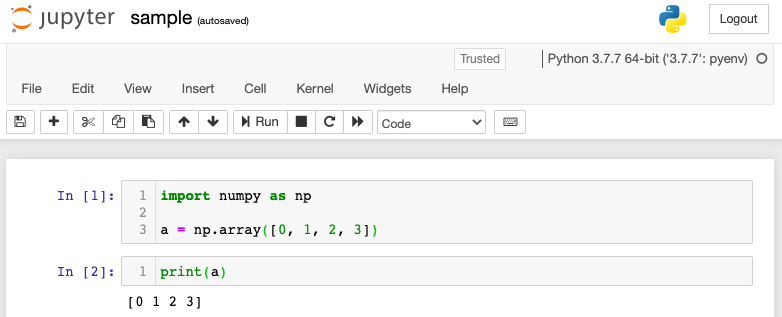
The content of “sample.ipynb” is below.

Content of “sample.ipynb”

Convert Command: “jupyter nbconvert”

Just run one line of command!

jupyter nbconvert --to script sample.ipynb

Then, you can get the python script, “sample.py”, with sucessful message, “Converting notebook sample.ipynb to script”.

:~/work$ls
>>sample.ipynb  sample.py

The contents of “sample.py” are as follows. In[1] and In[2] denote the first and second cells in “sample.ipynb”.

#!/usr/bin/env python
# coding: utf-8

# In[1]:

import numpy as np
a = np.array([0, 1, 2, 3])

# In[2]:

print(a)

In summary, we saw the one command can make it possible to convert jupyter notebook into python script. I hope you will use it!

List and Tuple, an explanation for Python beginners

There are many opportunities to handle data structures that group numbers and strings such as [1, 2, 3, ..] and [a, b, c, ..]. In general, A continuous data structure is called “array”. In Python, we call an array-like structure “list” or “tuple”. Why are there two names of array structures? That is because they are used differently. Python beginners may be confused. No problem! After reading this short article, you won’t be confused about which one to use. Just keep the one point of difference.

One point you should know

My understanding is as follows:

The difference between list and tuple is, in a word, “Whether you can change contents or not.” For example, you add a new element or change an element. When the case of “list”, you can. In contrast, you cannot modify “tuple” once you defined it.

That is all you should know.

List

List is a data structure, which has a sequence of elements. Besides, you can change, add, and delete any elements. In Python, we call this property “mutable”. Let’s confirm that list is mutable with a simple example.

>>> A = [1,  2,  3]
>>> A[0]
1

“A” is the list, which stores the array of 1, 2, and 3. The list is represented by “[]”. A[0] represents the first element 1. Note that, in Python, an index of list starts from 0.
By the way, since the list is mutable, let’s rewrite and add the elements inside.

>>> A[1] = 5  # A = [1,  2,  3]
>>> A
[1,  5,  3]

You can see that the second element A[1] was rewritten from “2” to “5”.

Next, let’s add a new element. Use append () to add a new element to the end of the list.

>>> A.append(10)  # A = [1,  5,  3]
>>> A
[1,  5,  3,  10]

You can see that “10” was added to the end of A by “A.append (10)”.

Now, let’s delete the element “10” that was just added.

>>> del A[3]  # A = [1,  5,  3,  10]
>>> A
[1,  5,  3]

“10” you just added was deleted.

As in the example above, we have confirmed that elements of list can be changed. Next, let’s see that tuple cannot be changed.

Tuple

Tuple is similar to list, sequence-type data structures. In contrast, we cannot change elements of tuple once after tuple is defined. In Python, we call this property “immutable”. Then, let’s take a simple example of how immutable it really is.

>>> A = (1, 2, 3)
>>> A[0]
1

A is the tuple, which stores the array of 1, 2, and 3. tuple is represented by “()”, and this is different from list. A[0] represents the first element of A, that is, A[0]=1. Note that tuple also uses “[]” when retrieving an element.

Then, let’s confirm that the elements of A cannot be changed, then you can experience the tuple is immutable.

>>> A[1] = 50
TypeError: ‘tuple’ object does not support item assignment

If you try to assign 50 to the second element A[1], it will stop and print the error message below.

TypeError: ‘tuple’ object does not support item assignment

Next, let’s try deleting element A[2].

>>> del A[1]
TypeError: ‘tuple’ object does not support item deletion

It will print the error message and stop.

TypeError: ‘tuple’ object does not support item deletion

Benefits of tuple

If possible, you may think list is more practical than tuple. It is true that list is more flexible. So, you should use list basically. Then, tuple is NOT needed? The answer is NO. There’s a situation when you should use tuple.

The advantages of tuple, Python beginners should know, are below:

  1. Small memory usage
  2. No risk of unintentional rewriting
  3. Usage as a dictionary key

The first one is basic knowledge for programmers. The more flexible it is, the less speed it is. Especially, Python is not a relatively fast language, so it is worth knowing how to make it faster.

The second one is useful for reducing bugs. It is said that programmers spend more time debugging than that writing code. Humans always make mistakes, and we should premise on this fact. If you know no need to change a list in advance, it should be a good choice to use tuple.

The third one is the usage of tuple as dictionary keys. Dictionary is also sequence data structures. This article hasn’t touched on dictionary, however, one thing to keep in mind is that you can’t use list as dictionary keys. Therefore, you need to understand tuple before learning a dictionary.