This article, written by the engineer at Microsoft, is so informative because many open source libraries are introduced for time series forecasting, including from low-level library(e.g. NumPy, SciPy) to high-level library(e.g. scikit-learn, Prophet, PyFlux, Sktime).
Notification version release of PyCaret. In version 2.3.5, some minor updates have been performed. For example, a dummy model for regression and classification is added. Besides, we are now able to change the probability threshold, default is 0.5, for such as logistic regression. And also, we can use an ipywigets dashboard from this version.
We spend a lot of time creating slides of PowerPoint. This article introduces a new tool for creating slides, which can replace PowerPoint. The new tool is available with Visual Studio code and Markdown style.
This article introduces several useful python libraries, especially for a data scientist. For example, one of them is “opendatasets“, a library for easy importing kaggle open datasets.
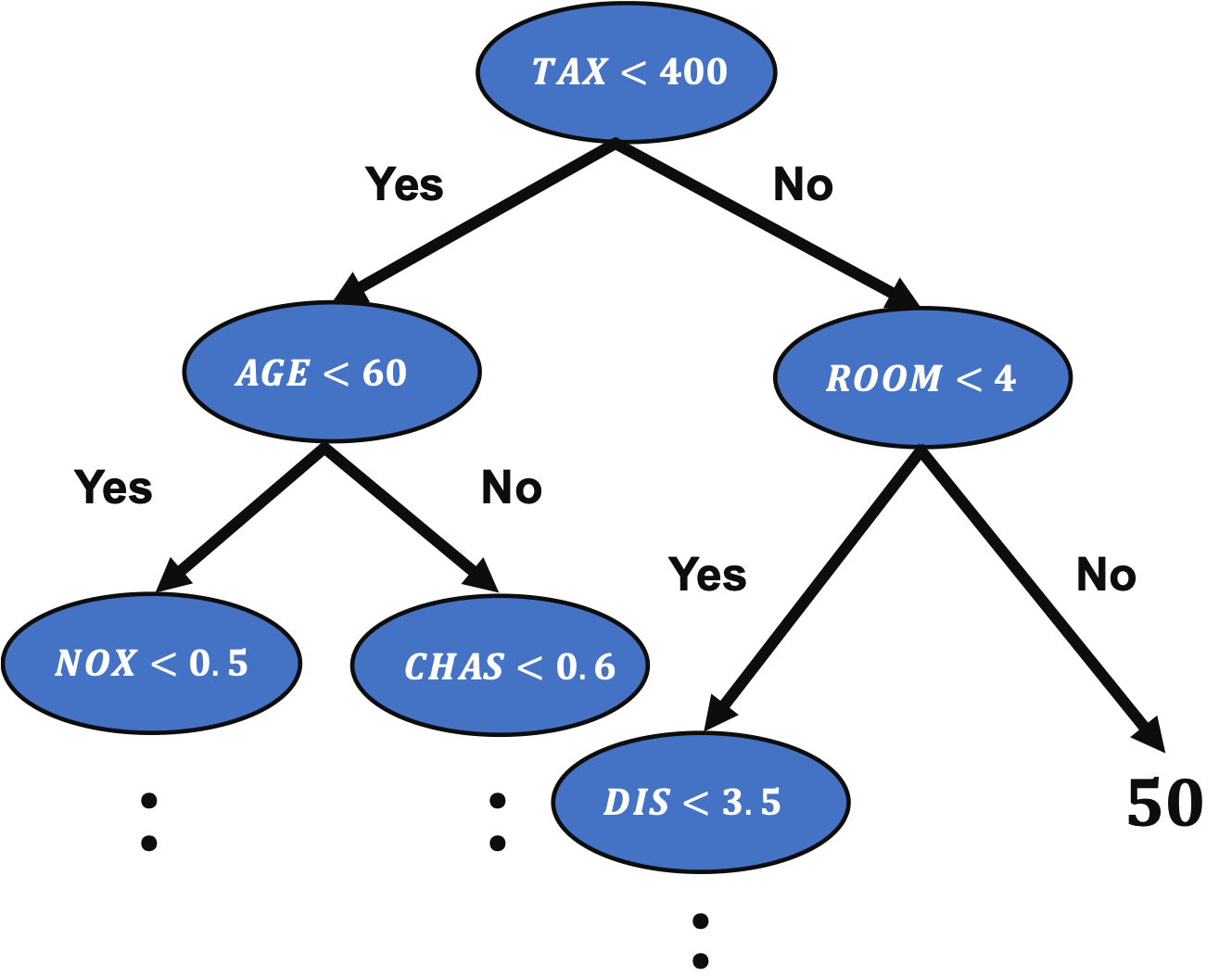
A decision tree method is an important method in machine learning because the famous algorithms, such as Random Forest and Gradient Boosting Decision Trees(GBDT), are based on the decision tree method.
In the previous post, we have seen a regression analysis of the decision tree method to the Boston house prices dataset.
Grid search is a method to explore all possible combinations.
For example, we think about two variables, $x_1$ and $x_2$, where $x_1 = [1, 2, 3]$ and $x_2 = [4, 5, 6]$. In this case, all possible combinations are as follows.
Therefore, computational costs increase proportionally to the number of variables and those levels.
As you can imagine, the disadvantage of grid search is that computational costs increase when the number of variables and those levels become larger.
Baseline of Analysis without tuning the Hyperparameters
First, we import the necessary libraries. And set the random seed.
import numpy as np
import pandas as pd
from sklearn.datasets import load_boston
from sklearn.tree import DecisionTreeRegressor
from sklearn.model_selection import train_test_split
from sklearn.metrics import r2_score
import matplotlib.pylab as plt
import seaborn as sns
sns.set()

random_state = 20211006
In this post, we use the Boston house prices dataset in the scikit-learn library. We can easily load the dataset by just two lines below.
dataset = load_boston()
The details of the Boston house prices dataset, an exploratory data analysis, are introduced in another post.
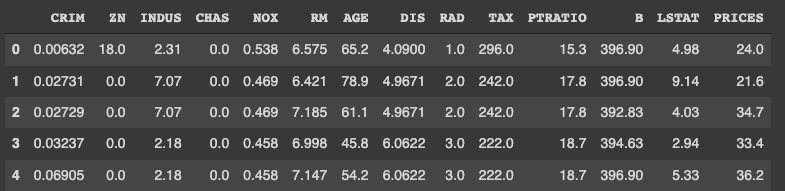
It is convenient to get the data as pandas DataFrame, making it possible to manipulate table data.
# explanatory data
df = pd.DataFrame(dataset.data)
df.columns = dataset.feature_names

# target data
df["PRICES"] = dataset.target

print(df.head())
Variables to be used
Here, we prepare the variable-name list. The description of each variable is also described in the comments.
TargetName = "PRICES"
FeaturesName = [
              #-- "Crime occurrence rate per unit population by town"
              "CRIM",
              #-- "Percentage of 25000-squared-feet-area house"
              'ZN',
              #-- "Percentage of non-retail land area by town"
              'INDUS',
              #-- "Index for Charlse river: 0 is near, 1 is far"
              'CHAS',
              #-- "Nitrogen compound concentration"
              'NOX',
              #-- "Average number of rooms per residence"
              'RM',
              #-- "Percentage of buildings built before 1940"
              'AGE',
              #-- 'Weighted distance from five employment centers'
              "DIS",
              ##-- "Index for easy access to highway"
              'RAD',
              ##-- "Tax rate per $100,000"
              'TAX',
              ##-- "Percentage of students and teachers in each town"
              'PTRATIO',
              ##-- "1000(Bk - 0.63)^2, where Bk is the percentage of Black people"
              'B',
              ##-- "Percentage of low-class population"
              'LSTAT',
              ]
We prepare the explanatory and target variables as “X” and “y”.
X = df[FeaturesName]
y = df[TargetName]
No need to perform standardization
We don’t need to standardize or normalize the numerical variable in a decision tree analysis. This is because the decision tree classifies the cases by focusing only on the magnitude relationship of the values. Therefore, the difference in the scale of the variables does NOT affect the final result.
Split the Dataset
To validate the performance of the trained model against unseen data, we have to split the dataset into the train data and the test data.
We pass the dataset “(X, y)” to the “train_test_split()” function. The rate of the train data and the test data is defined by the argument “test_size”. Here, the rate is set to be “8:2”. And, “random_state” is set for reproducibility. You can use any number.
X_train, X_test, y_train, y_test = train_test_split(X, y, test_size=0.2, random_state=random_state)
Create a model instance and Train the model
We create a decision tree instance as “regressor”, and pass the training dataset to it.
As an indicator of the accuracy of the model, we use the $R^{2}$ score, which is the index for how much the model is fitted to the dataset. The value range is from 0 to 1. When the value is close to $1$, indicating the model accuracy is good. Conversely, when $R^{2}$ approaches $0$, it means that the model accuracy is poor.
We can calculate $R^{2}$ by the “r2_score()” function in scikit-learn.
In this post, we tune one of the most parameters, “max_depth”. In the default setting “None”, decision trees can be branched without restrictions. This setting makes it overly easy to adapt to training, i.e., overfitting.
Therefore, we will try to find the optimum solution by setting the number of branches in the range of 1 to 9.
Define the argument name and search range as a dictionary.
Next, we define an instance of the grid search, where we pass the decision-tree-model instance and the above dictionary. Note that “cv” and “scoring” indicate the number of folds and metrics for validation, respectively.
from sklearn.model_selection import GridSearchCV

# Define a Grid Search as gs
gs = GridSearchCV(regressor, params, cv=5, scoring='neg_mean_squared_error', return_train_score=True)
Now, we are ready to go. Execute the grid search!
# Execute a grid search
gs.fit(X, y)
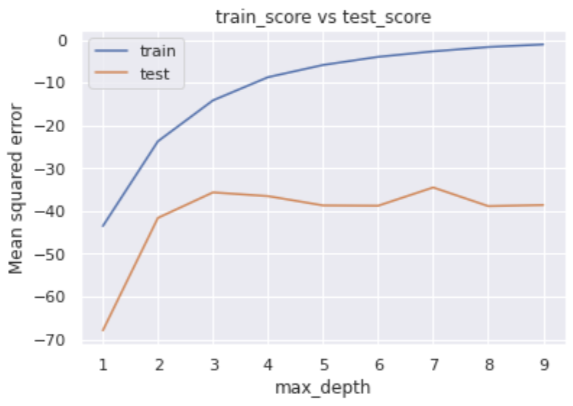
After finishing, we confirm the evaluations of the grid search. We check the metrics for each fold.
The error for the training data decreases as max_depth increases, while the error for the verification data does not show any significant improvement when the number of branches is 4 or more in the middle.
We can easily check the best parameter, i.e., optimized “max_depth”.
# Best parameters
print(gs.best_params_ )

>>  {'max_depth': 7}
The result suggests that the “max_depth” of 7 is the best.
In addition, we can also get the best model, i.e., when the “max_depth” of 7
# Best-parameter model
regressor_best = gs.best_estimator_
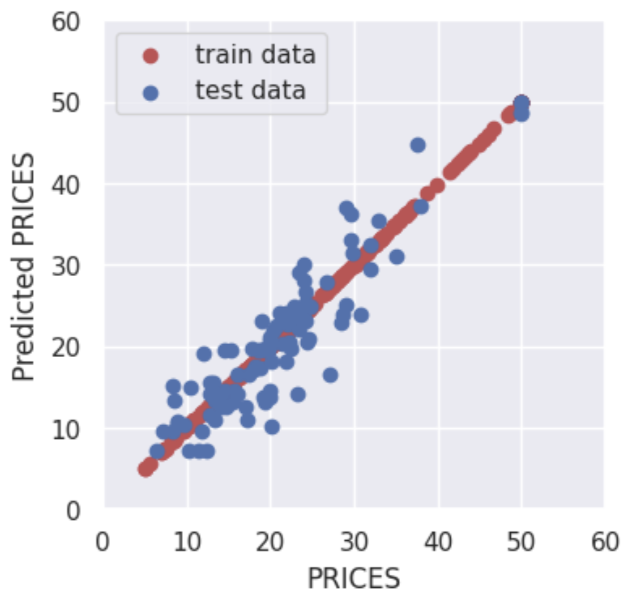
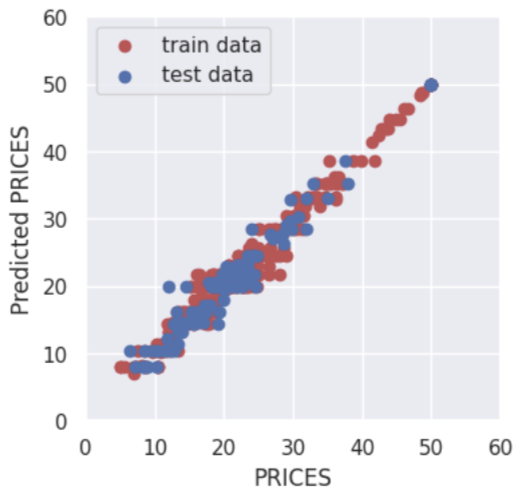
Here, let’s evaluate the $R2$ value again. We will see the model has been improved.
By adjusting the hyperparameters, the accuracy for the training data is reduced, but the accuracy for the validation data is improved.
In other words, it was a situation of overfitting against the training data, but by setting appropriate hyperparameters, the generalization performance of the model was improved.
Summary
We have seen how to tune the hyperparameters of the decision tree model. In this post, we adopt a Grid Search method. A grid search method is easy to understand and implement.
This time we tried with only one variable, but the case for multi variables can be implemented in the same way. We have defined hyperparameters as a dictionary, but we just need to add additional variables there.
The author hopes this blog helps readers a little.
The author felt a topic is interesting. For a programmer, algorithms are important. In practice, flexible thinking is important. And leave the idea as a comment.
Time series analysis is a little bit different from other analyses. In particular, the way of verification and feature engineering is unusual, so this is an area that you should know at least once.
Google colab is useful because we can use GPU for free! However, we could NOT use the colab from VS code, a modern editor for code editing. This article tells us how to use colab from VS code.
We need a dataset to try out quickly something new method we learned. Therefore, it’s very important to get used to working with open datasets.
In this post, several open datasets, which are included in scikit-learn, will be introduced. From scikit-learn, we can easily and quickly use these datasets for regression and classification analyses.
scikit-learn is one of the famous python libraries for machine learning. scikit-learn is easy to use, powerful, and including a variety of techniques. It can be widely used from statistical analysis to machine learning to deep learning.
Open Toy datasets in scikit-learn
scikit-learn is not only used to implement machine learning but also contains various datasets. it should be noted here that the toy dataset introduced below can be used offline once scikit-learn is installed.
By using scikit-learn, we can use the above datasets in the same way.
Let’s first take the Boston home price dataset as an example. Once you understand this example, you can treat the rest of the dataset as well.
Import common libraries
Here, import the commonly used python library.
import pandas as pd
Boston house prices dataset
This dataset is for regression analysis. Therefore, we can utilize this dataset to try a method for regression analysis you learned.
First, we import the dataset module from scikit-learn. The dataset is included in the sklearn.datasets module.
from sklearn.datasets import load_boston
Second, create the instance of the dataset. In this instance, various information is stored, i.e., the explanatory data, the names of features, the regression target data, and the description of the dataset. Then, we can extract and use information from this instance as needed.
# instance of the boston house-prices dataset
dataset = load_boston()
We can confirm the details of the dataset by the DESCR method.
print(dataset.DESCR)


>> .. _boston_dataset:
>>
>> Boston house prices dataset
>> ---------------------------
>>
>> **Data Set Characteristics:**
>>
>>     :Number of Instances: 506
>>
>>     :Number of Attributes: 13 numeric/categorical predictive. Median Value (attribute 14) is usually the target.
>>
>>     :Attribute Information (in order):
>>         - CRIM     per capita crime rate by town
>>         - ZN       proportion of residential land zoned for lots over 25,000 sq.ft.
>>         - INDUS    proportion of non-retail business acres per town
>>         - CHAS     Charles River dummy variable (= 1 if tract bounds river; 0 otherwise)
>>         - NOX      nitric oxides concentration (parts per 10 million)
>>         - RM       average number of rooms per dwelling
>>         - AGE      proportion of owner-occupied units built prior to 1940
>>         - DIS      weighted distances to five Boston employment centres
>>         - RAD      index of accessibility to radial highways
>>         - TAX      full-value property-tax rate per $10,000
>>         - PTRATIO  pupil-teacher ratio by town
>>         - B        1000(Bk - 0.63)^2 where Bk is the proportion of blacks by town
>>         - LSTAT    % lower status of the population
>>         - MEDV     Median value of owner-occupied homes in $1000's
>>
>>     :Missing Attribute Values: None
>>
>>     :Creator: Harrison, D. and Rubinfeld, D.L.
>>
>>     .
>>     .
>>     .
Next, we confirm the contents of the dataset.
The contents of the dataset variable “dataset” can be accessed by specific methods. In this variable, several kinds of information are stored. The list of them is as follows.
dataset.data: the explanatory-variable values dataset.feature_names: the explanatory-variable names dataset.target: values of the target variable
First, we take the data and the feature names of the explanatory variables.
The data type of the above variable X is numpy array. For convenience, we convert the dataset into the Pandas DataFrame type. With the DataFrame type, we can easily manipulate the table-type dataset and perform the preprocessing.
# convert the data type from numpy array into pandas DataFrame
X = pd.DataFrame(X, columns=feature_names)
# display the first five rows.
print(X.head())
>> CRIM ZN INDUS CHAS NOX ... RAD TAX PTRATIO B LSTAT
>> 0 0.00632 18.0 2.31 0.0 0.538 ... 1.0 296.0 15.3 396.90 4.98
>> 1 0.02731 0.0 7.07 0.0 0.469 ... 2.0 242.0 17.8 396.90 9.14
>> 2 0.02729 0.0 7.07 0.0 0.469 ... 2.0 242.0 17.8 392.83 4.03
>> 3 0.03237 0.0 2.18 0.0 0.458 ... 3.0 222.0 18.7 394.63 2.94
>> 4 0.06905 0.0 2.18 0.0 0.458 ... 3.0 222.0 18.7 396.90 5.33
Finally, we take the target-variable data.
# target variable
y = dataset.target
# display the first five elements.
print(y[0:5])
>> [24. 21.6 34.7 33.4 36.2]
Now you have the explanatory variable X and the target variable y ready. In the real analysis, the process from here is performing preprocessing the data, creating the model, and validating the accuracy of the model.
You can do the same procedures for other datasets. The code for each dataset is described below.
Iris dataset
This dataset is for classification analysis.
from sklearn.datasets import load_iris
# instance of the iris dataset
dataset = load_iris()
# explanatory variables
X = dataset.data
# feature names
feature_names = dataset.feature_names
# convert the data type from numpy array into pandas DataFrame
X = pd.DataFrame(X, columns=feature_names)
# target variable
y = dataset.target
Diabetes dataset
This dataset is for regression analysis.
from sklearn.datasets import load_diabetes


# instance of the Diabetes dataset
dataset = load_diabetes()
# explanatory variables
X = dataset.data
# feature names
feature_names = dataset.feature_names
# convert the data type from numpy array into pandas DataFrame
X = pd.DataFrame(X, columns=feature_names)
# target variable
y = dataset.target
Digits dataset
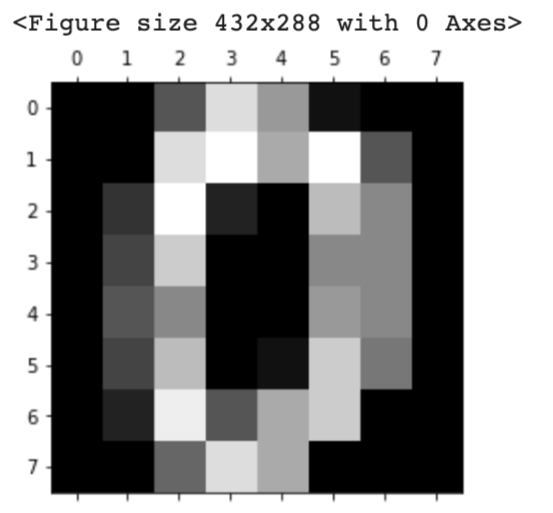
This dataset is for classification analysis. It must be noted here that this dataset is image data. Therefore, the methods for taking each data are different from other datasets.
dataset.images: the raw image data dataset.feature_names: the explanatory-variable names dataset.target: values of the target variable
from sklearn.datasets import load_digits


# instance of the digits dataset
dataset = load_digits()
# explanatory variables
X = dataset.images  # X.shape is (1797, 8, 8)

# target variable(0, 1, 2, .., 8, 9)
y = dataset.target

# Display the image
import matplotlib.pyplot as plt
plt.gray()
plt.matshow(X[0])
plt.show()
Physical excercise linnerud dataset
This dataset is for multi-target regression analysis. In this dataset, the target variable has three outputs.
from sklearn.datasets import load_linnerud


# instance of the physical excercise linnerud dataset
dataset = load_linnerud()
# explanatory variables
X = dataset.data
# feature names
feature_names = dataset.feature_names
# convert the data type from numpy array into pandas DataFrame
X = pd.DataFrame(X, columns=feature_names)
# target variable
y = dataset.target

X.head()
print(y)
Wine dataset
This dataset is for classification analysis.
from sklearn.datasets import load_wine


# instance of the wine dataset
dataset = load_wine()
# explanatory variables
X = dataset.data
# feature names
feature_names = dataset.feature_names
# convert the data type from numpy array into pandas DataFrame
X = pd.DataFrame(X, columns=feature_names)
# target variable
y = dataset.target
Breast cancer wisconsin dataset
This dataset is for regression analysis.
from sklearn.datasets import load_breast_cancer


# instance of the Breast cancer wisconsin dataset
dataset = load_breast_cancer()
# explanatory variables
X = dataset.data
# feature names
feature_names = dataset.feature_names
# convert the data type from numpy array into pandas DataFrame
X = pd.DataFrame(X, columns=feature_names)
# target variable
y = dataset.target
Summary
In this post, we have seen several famous datasets in scikit-learn. Open datasets are important to try out quickly something new method we learned.
Therefore, let’s get used to working with open datasets.
In this post, we will learn how to build a docker container for streamlit.
We create a docker image from a Dockerfile. And, we will see how to construct and run a docker container, and build a web app on its container.
Dockerfile
The entire contents of the Dockerfile are as follows.
FROM python:3.9

WORKDIR /opt
RUN pip install --upgrade pip
RUN pip install numpy==1.21.0 \
				pandas==1.3.0 \
				scikit-learn==0.24.2 \
				matplotlib==3.4.2 \
				seaborn==0.11.1 \
				plotly==5.1.0 \
				streamlit==0.84.1

WORKDIR /work
We create the docker image based on the python image, whose version is 3.9. Of course, we can specify the version in more detail, such as “FROM python:3.9.2” in the first sentence.
By the sentence “WORKDIR /opt”, we specify the directory for installing the python libraries.
And, we upgrade pip, to install the external python libraries in order. In addition to streamlit, to make things easier later, we also install numpy, pandas, scikit-learn, matplotlib, seaborn, and plotly.
Note that the last sentence ‘WORKDIR /work’ indicates that the current directory is set at ‘/work/’ after we enter the docker container.
Build a Dockerfile
Let’s create a docker image from the Dockerfile. Execute the following command in the directory where the Dockerfile exists.
$ docker build .
After building the docker image, you can confirm the result by the following command. Later, we will use the ‘IMAGE ID’.
$ docker images
Run a docker container
Here, we run the docker container from the above docker image. The command format is as follows.
$ docker run -it -p 8888:8888 -v ~/mounted_to_docker/:/work <IMAGE ID> bash

'-p 8888:8888':
-> Allows the port, whose number is 8888, in a docker container

'-v ~/mounted_to_docker/:/work':
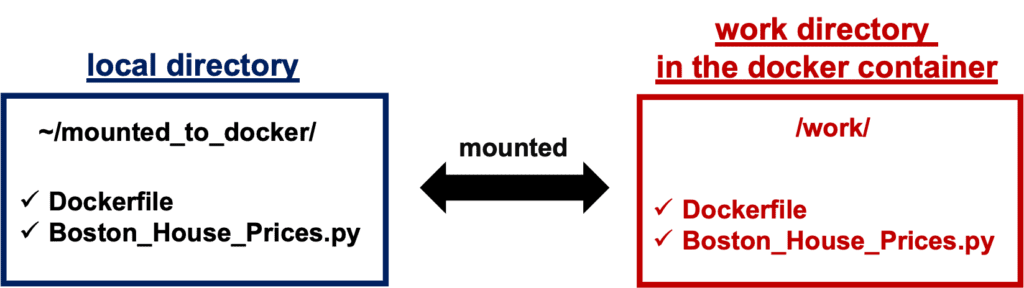
->Synchronizes the local directory you specified('~/mounted_to_docker/') with the directory in the container('/work').
$ docker run -it -p 8888:8888 -v ~/mounted_to_docker/:/work 8316e8947747 bash
When the docker container was successfully running, you would be in the container.
Your local directory ‘~/mounted_to_docker/’ is mounted to the working directory ‘/work’ in the container.
By the ‘ls’ command, you can check whether your local directory is mounted to the working directory in the container.
Run streamlit
In the container, it is possible to use streamlit. You can execute your python script designed with streamlit as follows.
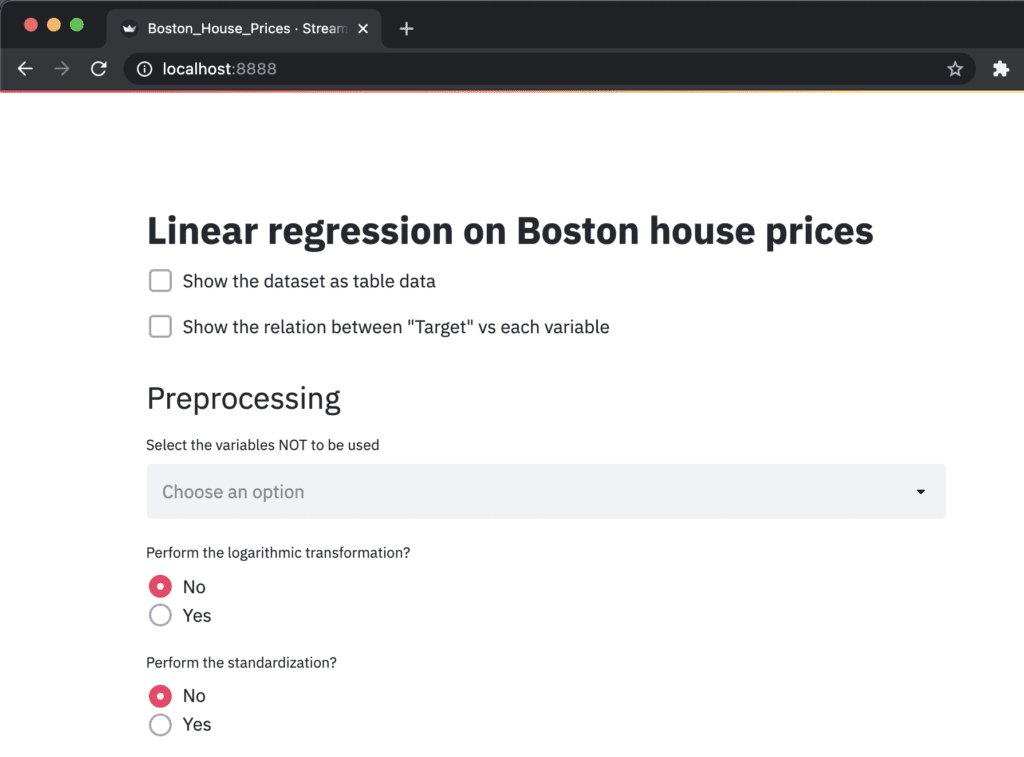
$ streamlit run Boston_House_Prices.py --server.port 8888
The ‘Network URL: http://172.17.0.2:8888’ is combined to ‘localhost:8888’. Therefore, you can view your web app created from ‘Boston_House_Prices.py’ at ‘localhost:8888’ in a web browser.
Congulaturation!! You have prepared the environment for using streamlit.
Example of Streamlit
At this point, you can prepare an environment for using streamlit by docker. Therefore, you can try streamlit, deploying your data analysis into a web app!
The following articles may be useful for you. You can try a regression analysis or a principal component analysis(PCA), and deploy them into a web app by streamlit.
Pycaret is an open-source low-code machine learning library in Python. By Pycaret, we can easily deploy a machine learning model. In this article, we can know it is also easy to perform an anomaly-detection analysis by Pycaret!
[News] A streamlit tutorial book has been published on Amazon Kindle!
I have published the book for a tutorial of Streamlit; “Tutorial of a Deployment of a Web app by Python and Streamlit for a Data Scientist”.
This new book is registered on Kindle Unlimited, so any member can read it !!
Features of this book
For beginners of Streamlit
Be aware of simple explanations
All with sample code
Introducing data analysis as a web application as an example
The book about streamlit, published on Amazon Kindle, was major updated. In this major update, the content about PCA(principal component analysis) has been added.
The book is entitled “Tutorial of a Deployment of a Web app by Python and Streamlit for a Data Scientist”.
This book is registered on Kindle Unlimited, so any member can read it !!
Features of this book
For beginners of Streamlit
Be aware of simple explanations
All with sample code
Introducing data analysis as a web application as an example
What is Streamlit?
Streamlit is a wonderful library, making it easier and faster to build a web app for your data science project. By Streamlit, we can easily convert python script into a web app. Namely, we can publish our data analyses as a web app.
Articles about Streamlit have been posted in the past. The book was created with detailed explanations added. Especially, if you want to study all at once, please check it!
Regular expressions are one of the most essential skills, increasing your productivity. This article introduces how to use the “re” module, a famous build-in python library for regular expressions. It would be worth reading if you are unfamiliar with regular expressions.
This article is a long story, but informative. We can learn an example to use machine learning for finance. The topic is pair trading. We use machine learning to select the pair for long and short positions.
[News] A streamlit tutorial book has been published on Amazon Kindle!
I have published the book for a tutorial of Streamlit; “Tutorial of a Deployment of a Web app by Python and Streamlit for a Data Scientist”.
This new book is registered on Kindle Unlimited, so any member can read it !!
Features of this book
For beginners of Streamlit
Be aware of simple explanations
All with sample code
Introducing data analysis as a web application as an example