PyCaret is a useful auto ML python library because we can deploy machine learning models with low codes. We can also perform preprocessing, compare models, and tune hyperparameters, of course with low codes.
This article is a summary of the list of the PyCaret articles introduced in this blog.
We create a docker image for PyCaret from Dockerfile. This post is intended for mastering how to build a docker image from Dockerfile with docker commands.
In this post, we will see the tutorial of PyCaret with a regression analysis against the Boston house prices dataset. This post is intended with the step-by-step guide in mind.
This post is one of the good examples of regression analysis.
The purpose is to learn the basics of regression analysis using PyCaret. Using a famous data set, we will master the basics of everything from model construction to analysis of results.
In version 2.3.6, several new features were added. In this article, You can check the major changes. These articles are also worth reading to get an idea of the latest new features in PyCaret.
PyCaret is a useful auto ML python library because we can deploy machine learning models with low codes. We can also perform preprocessing, compare models, and tune hyperparameters, of course with low codes.
Recently, PyCaret version 2.3.6 was released. This is big news because several new wonderful functions were implemented in this release version! The details are described in this article written by PyCaret creator.
In this article, we will check the summary of this release. And, the three new features will be introduced.
New Features
Dashboard: interactive dashborad for a trained model.
EDA: Explonatory Data Analysis
Convert Model: converting a trained model from python into other programing language, such as C, Java, Go, JavaScript, Visual Basic, C#, PowerShell, R, PHP, Dart, Haskell, Ruby, F#.
As seeing the above new feature list, PyCaret is evolving dramatically!
In the following, we will introduce some of the new functions using normal regression analysis as an example.
Installation
If you have NOT installed PyCaret yet, you can easily install it by the following command. Note that specify the PyCaret version!
$pip install pycaret==2.3.6
From here, the sample code in this post is supposed to run on Jupyter Notebook.
Import Libraries
In advance, we load all the modules for regression analysis of PyCaret.
from pycaret.regression import *
Dataset
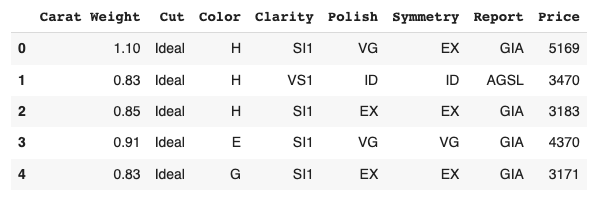
We use the diamond dataset for regression analysis.
# load dataset
from pycaret.datasets import get_data

df = get_data('diamond')
Set up the environment by the “setup()” function
PyCaret needs to initialize an environment by the “setup()” function. Conveniently, PyCaret infers the data type of the variables in the dataset.
Arguments of setup() are the dataset as Pandas DataFrame, the target-column name, and the “session_id”. The “session_id” equals a random seed.
s = setup(df, target='Price', session_id = 20220121)
Create a Model
Due to the simplicity of the technique and the interpretability of the model, we will adopt lr(Linear Regression) for the models that will be used below.
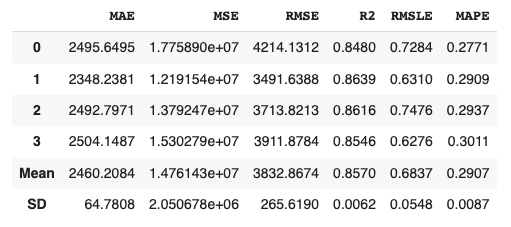
We can create the selected model by create_model() with the argument of “lr”. Another argument of “fold” is the number of cross-validation. “fold = 4” indicates we split the dataset into four and train the model in each dataset separately.
lr = create_model("lr", fold=4)
Introduction of New Features of PyCaret 2.3.6
From here, we will introduce two of the new features.
Convert model
With this new function, we can convert a trained model into another language, e. g. from python to C. This function is very useful when operating the created model.
Note that we need to install the dependency libraries.
PyCaret is a useful auto ML python library because we can deploy machine learning models with low codes. We can also perform preprocessing, compare models, and tune hyperparameters, of course with low codes.
Recently, PyCaret version 2.3.6 was released. This is big news because several new wonderful functions were implemented in this release version! The details are described in this article written by PyCaret creator.
In this article, we will check the summary of this release. And, the three new features will be introduced.
New Features
Dashboard: interactive dashborad for a trained model.
EDA: Explonatory Data Analysis
Convert Model: converting a trained model from python into other programing language, such as C, Java, Go, JavaScript, Visual Basic, C#, PowerShell, R, PHP, Dart, Haskell, Ruby, F#.
As seeing the above new feature list, PyCaret is evolving dramatically!
In the following, we will introduce some of the new functions using normal regression analysis as an example.
Installation
If you have NOT installed PyCaret yet, you can easily install it by the following command. Note that specify the PyCaret version!
$pip install pycaret==2.3.6
From here, the sample code in this post is supposed to run on Jupyter Notebook.
Import Libraries
In advance, we load all the modules for regression analysis of PyCaret.
from pycaret.regression import *
Dataset
We use the diamond dataset for regression analysis.
# load dataset
from pycaret.datasets import get_data

df = get_data('diamond')
Set up the environment by the “setup()” function
PyCaret needs to initialize an environment by the “setup()” function. Conveniently, PyCaret infers the data type of the variables in the dataset.
Arguments of setup() are the dataset as Pandas DataFrame, the target-column name, and the “session_id”. The “session_id” equals a random seed.
s = setup(df, target='Price', session_id = 20220121)
Create a Model
Due to the simplicity of the technique and the interpretability of the model, we will adopt lr(Linear Regression) for the models that will be used below.
We can create the selected model by create_model() with the argument of “lr”. Another argument of “fold” is the number of cross-validation. “fold = 4” indicates we split the dataset into four and train the model in each dataset separately.
lr = create_model("lr", fold=4)
Introduction of New Features of PyCaret 2.3.6
From here, we will introduce two of the new features.
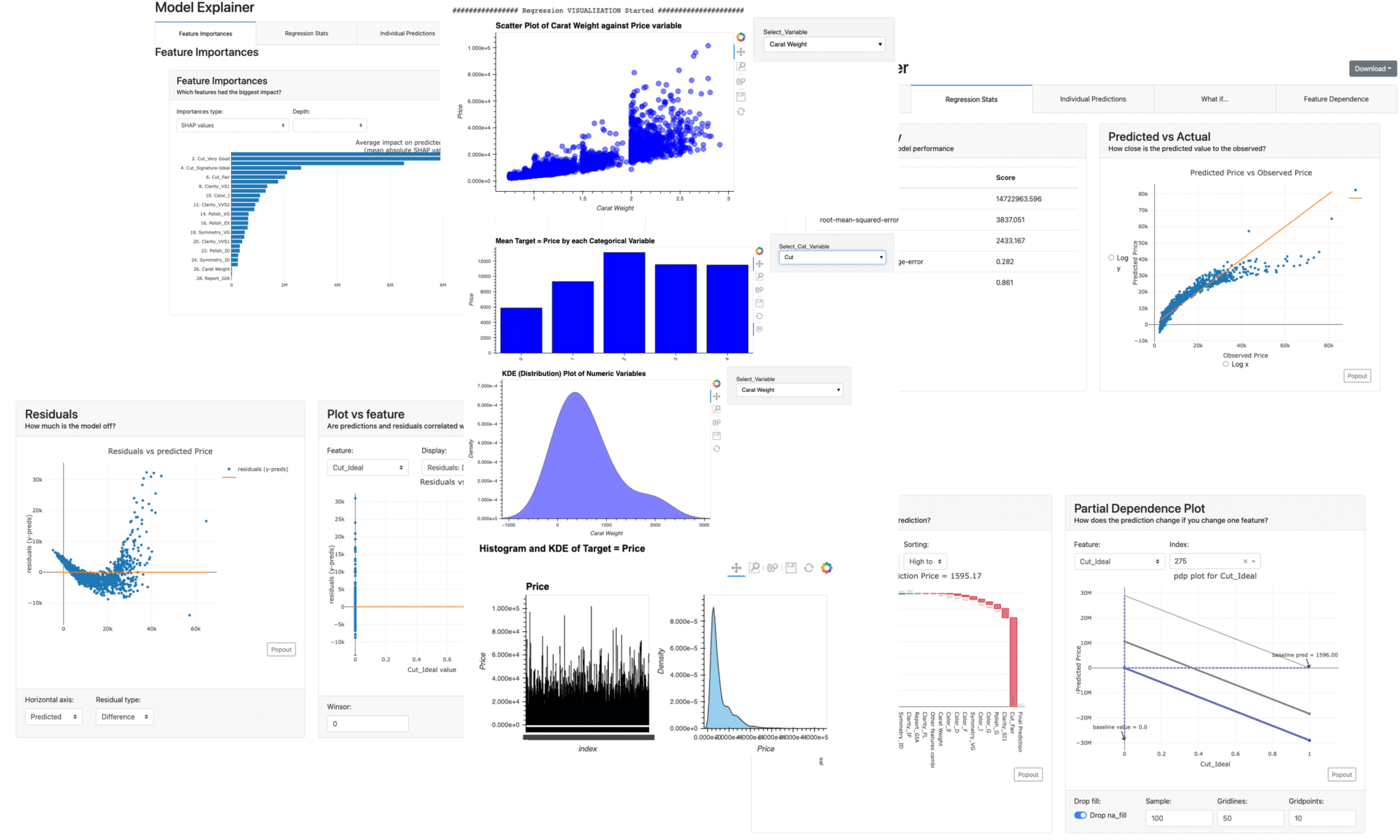
Dashboard
With this new function, we can create a dashboard for a trained model.
The dashboard function is implemented by ExplainerDashboard, we need the “explainerdashboard” library. We can install it with the pip command.
$pip install explainerdashboard
Then, we can create a dashboard.
dashboard(model)
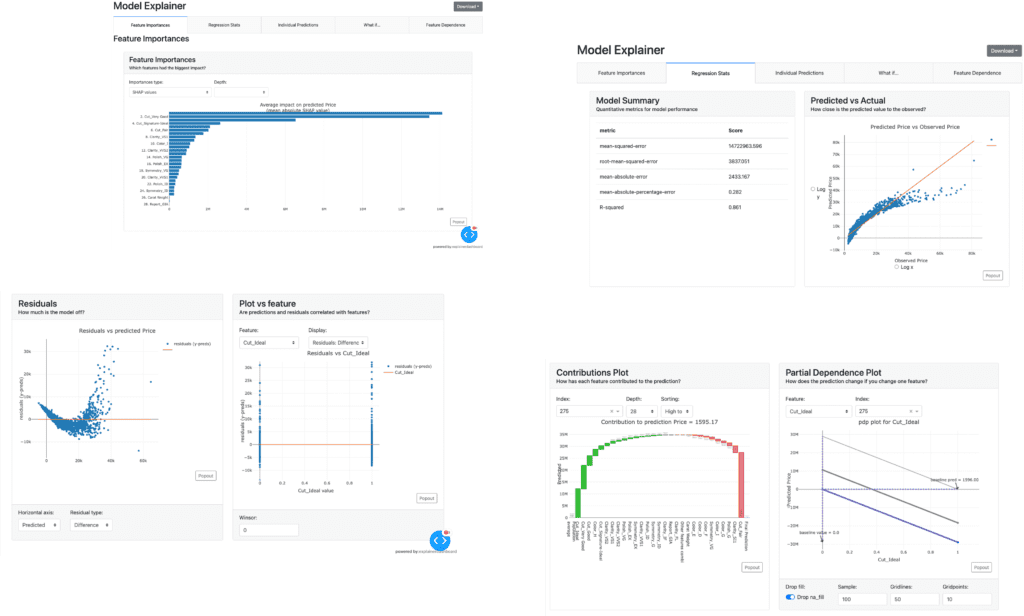
Parts of the dashboard screen are introduced in the figure below.
EDA(Exploratory Data Analysis)
This new function requires the “autoviz” library.
$pip install autoviz
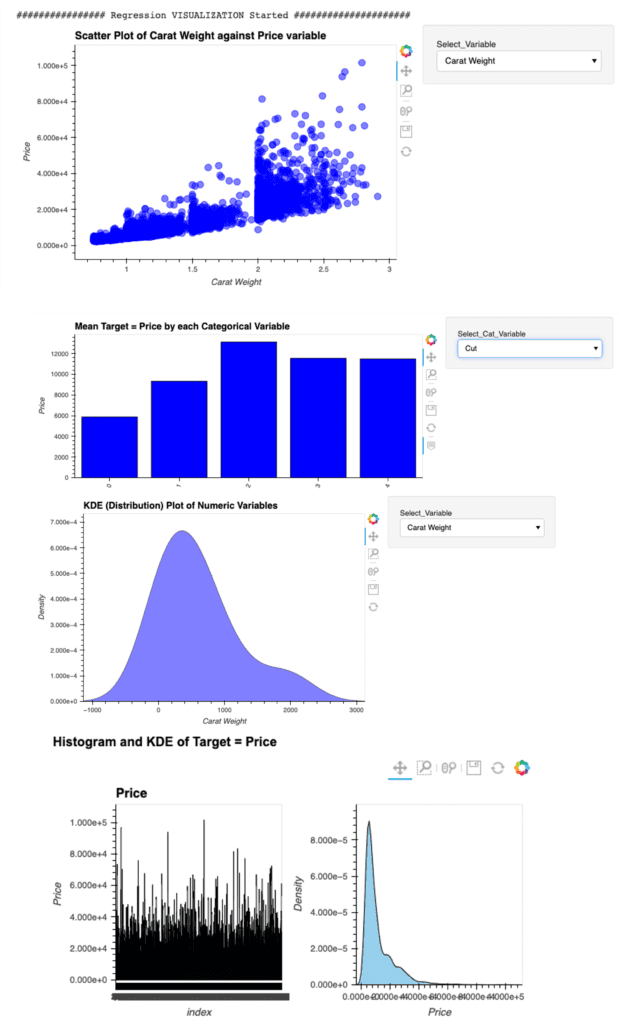
Just 1 line code. We can perform the EDA.
eda()
Summary
We have seen the new features of PyCaret 2.3.6.
In this article, we saw the Dashboard and EDA function.
Just 1 line.
We can create a dashboard and perform the EDA of a trained model. Wouldn’t it be great? If you sympathize with it, please give it a try.
The author hopes this blog helps readers a little.
In this post, we will learn the tutorial of PyCaret from the regression problem; prediction of diabetes progression. PyCaret is so useful especially when you start to tackle a machine learning problem such as regression and classification problems. This is because PyCaret makes it easy to perform preprocessing, comparing models, hyperparameter tuning, and prediction.
Requirement
PyCaret is now highly developed, so you should check the version of the library.
If you have NOT installed PyCaret yet, you can easily install it by the following command on your terminal or command prompt.
$pip install pycaret
Or you can specify the version of PyCaret.
$pip install pycaret==2.2.3
From here, the sample code in this post is supposed to run on Jupyter Notebook.
Import Library
##-- PyCaret
import pycaret
from pycaret.regression import *
##-- Pandas
import pandas as pd
from pandas import Series, DataFrame
##-- Scikit-learn
import sklearn
Load dataset
In this post, we use “the diabetes dataset” from scikit-learn library. This dataset is easy to use because we can load this dataset from the scikit-learn library, NOT from the external file.
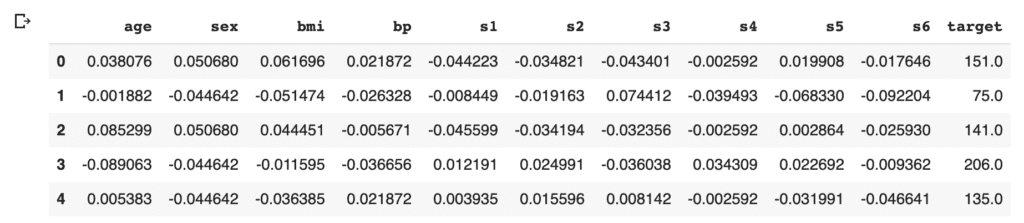
We will predict a quantitative measure of diabetes progression one year after baseline. So, the target variable is diabetes progression in “dataset.target“. And, there are ten explanatory variables (age, sex, body mass index, average blood pressure, and six blood serum measurements).
First, load the dataset from “load_diabetes()” as “dataset”. And, for convenience, convert the dataset into the pandas-DataFrame form.
from sklearn.datasets import load_diabetes
dataset = load_diabetes()

df = pd.DataFrame(dataset.data)
It should be noted that we can confirm the description of the dataset.
print(dataset.DESCR)
An excerpt of the explanation of the explanatory variables is as follows.
:Attribute Information:
    - age     age in years
    - sex
    - bmi     body mass index
    - bp      average blood pressure
    - s1      tc, T-Cells (a type of white blood cells)
    - s2      ldl, low-density lipoproteins
    - s3      hdl, high-density lipoproteins
    - s4      tch, thyroid stimulating hormone
    - s5      ltg, lamotrigine
    - s6      glu, blood sugar level
Then, we assign the above names of the columns to the data frame of pandas. And, we create the “target” column, i.s., the prediction target, and assign the supervised values.
Here, we devide the dataset into train- and test- datasets, making it possible to check the ability of the trained model against an unseen data. We split the dataset into train and test datasets, as 8:2.
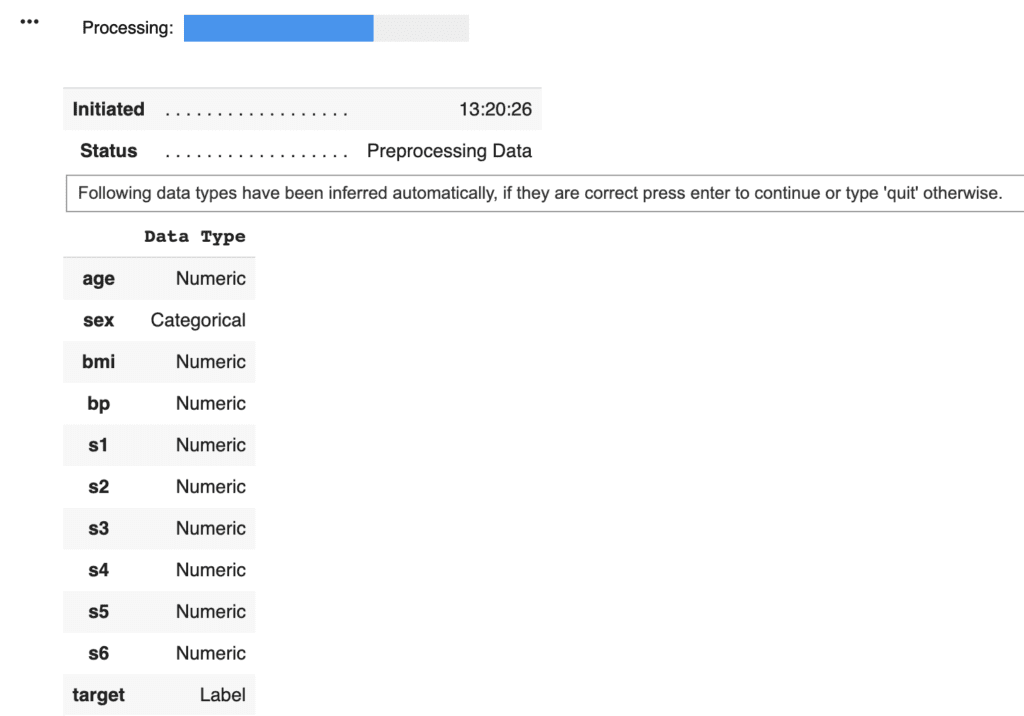
PyCaret needs to initialize an environment by the “setup()” function. Conveniently, PyCaret infers the data type of the variables in the dataset. Due to regression analysis, let’s leave only the numerical data. Namely, we delete the categorical variables. This approach would be practical as a first analysis to understand the dataset.
Arguments of setup() are the dataset as Pandas DataFrame, the target-column name, and the “session_id”. The “session_id” equals a random seed.
model = setup(data = data, target = "target", session_id=99)
PyCaret told us that just “sex” is a categorical variable. Then, we drop its columns and reset up.
data = data.drop('sex', 1) # "1" indicate the columns.
model = setup(data = data, target = "target", session_id=99)
Compare models
We can easily compare models between different machine-learning methods. It is so practical just to know which is more effective, the regression model or the decision tree model.
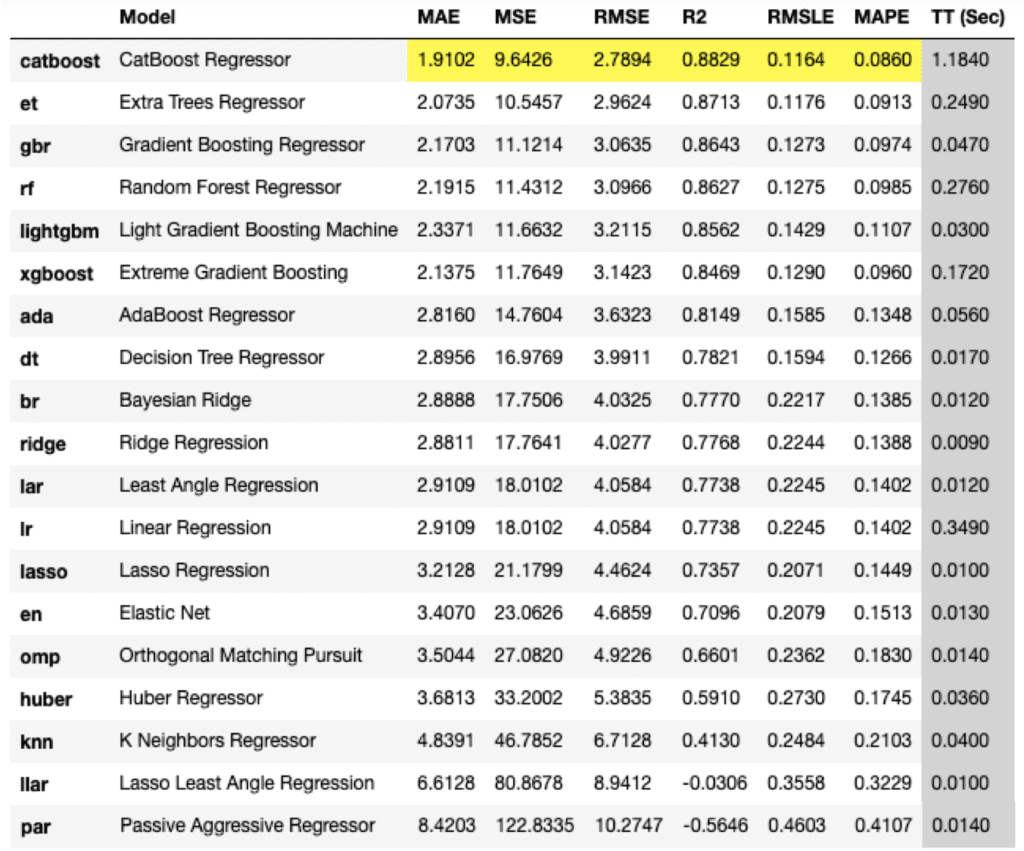
compare_models()
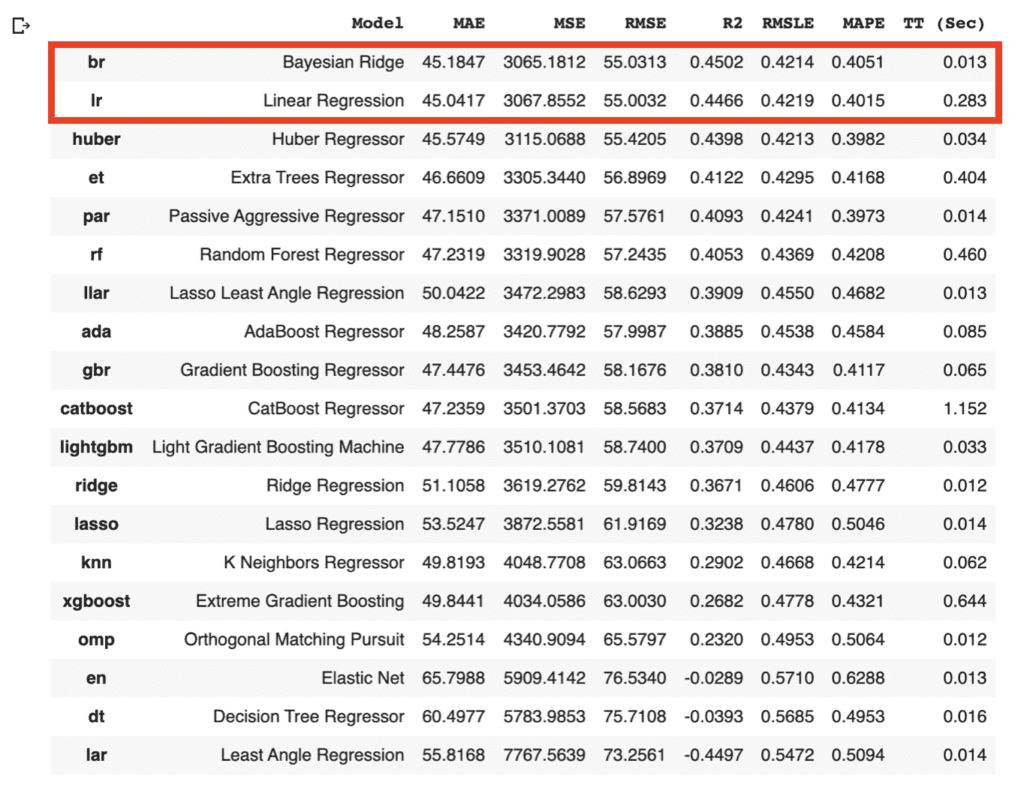
As the above results, the br(Bayesian Ridge) and lr(Linear Regression) have the highest accuracies in the above models. In general, there is a tendency that a decision tree method realizes a higher accuracy than that of a regression method. However, from the viewpoint of model interpretability, the regression method is more effective than the decision tree method, especially when the accuracy is almost the same. Regression analysis tends to be easy to provide insight into the dataset.
Due to the simplicity of the technique and the interpretability of the model, we will adopt lr(Linear Regression) for the models that will be used below. The details of the linear regression technique are described in another post below.
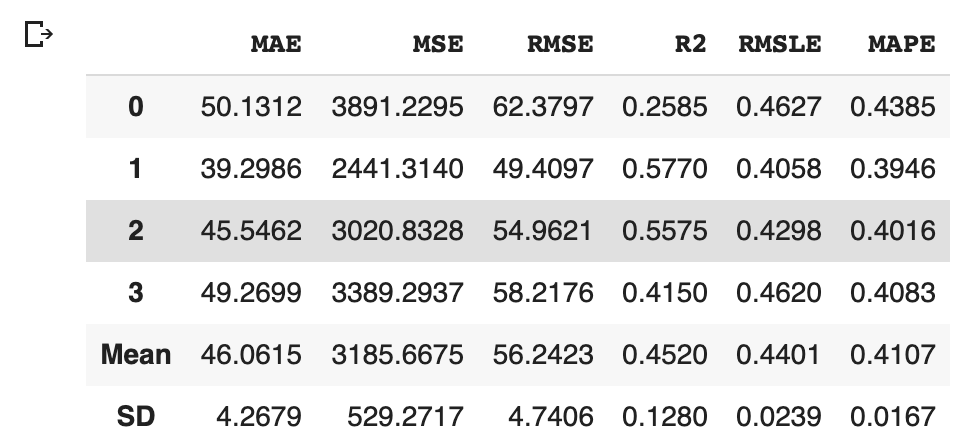
We can create the selected model by create_model() with the argument of “lr”. Another argument of “fold” is the number of cross-validation. “fold = 4” indicates we split the dataset into four and train the model in each dataset separately.
lr = create_model("lr", fold=4)
Optimize Hyperparameters
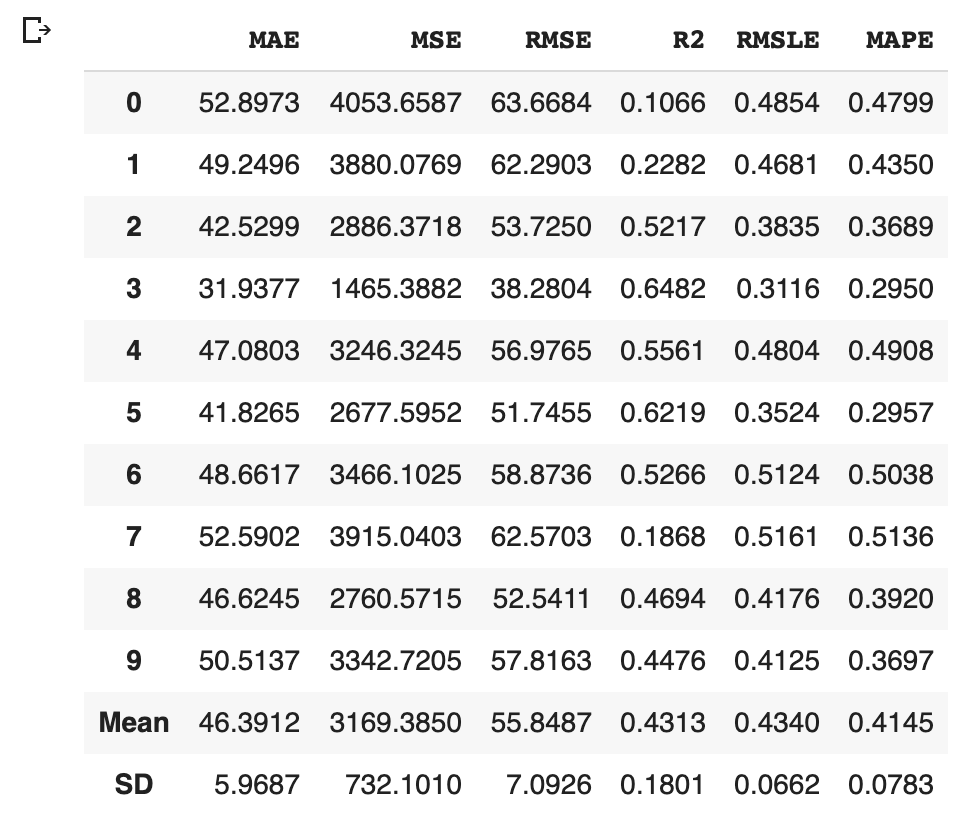
PyCaret makes it possible to optimize the hyperparameters. Just you pass the object cerated by create_model() to tune_model(). Note that optimization is done by the random grid-search technique.
Predict the test data
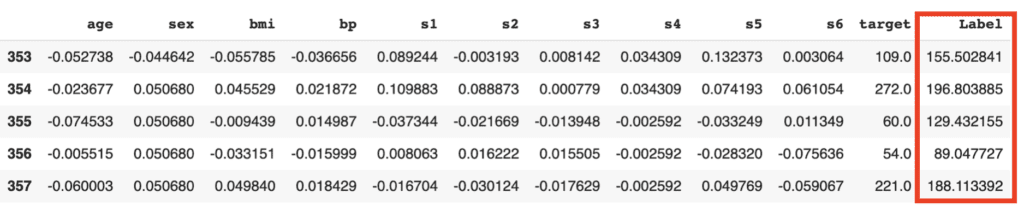
Let’s predict the test data by the above model. We can do it easily with just one sentence.
The added column, “Label”, is the predicted values. Besides, we can confirm the famous metric, such as $R^2$.
from pycaret.utils import check_metric
check_metric(predictions["target"], predictions["Label"], 'R2')

>>  0.535
Visualization
It is also easy to visualize the results.
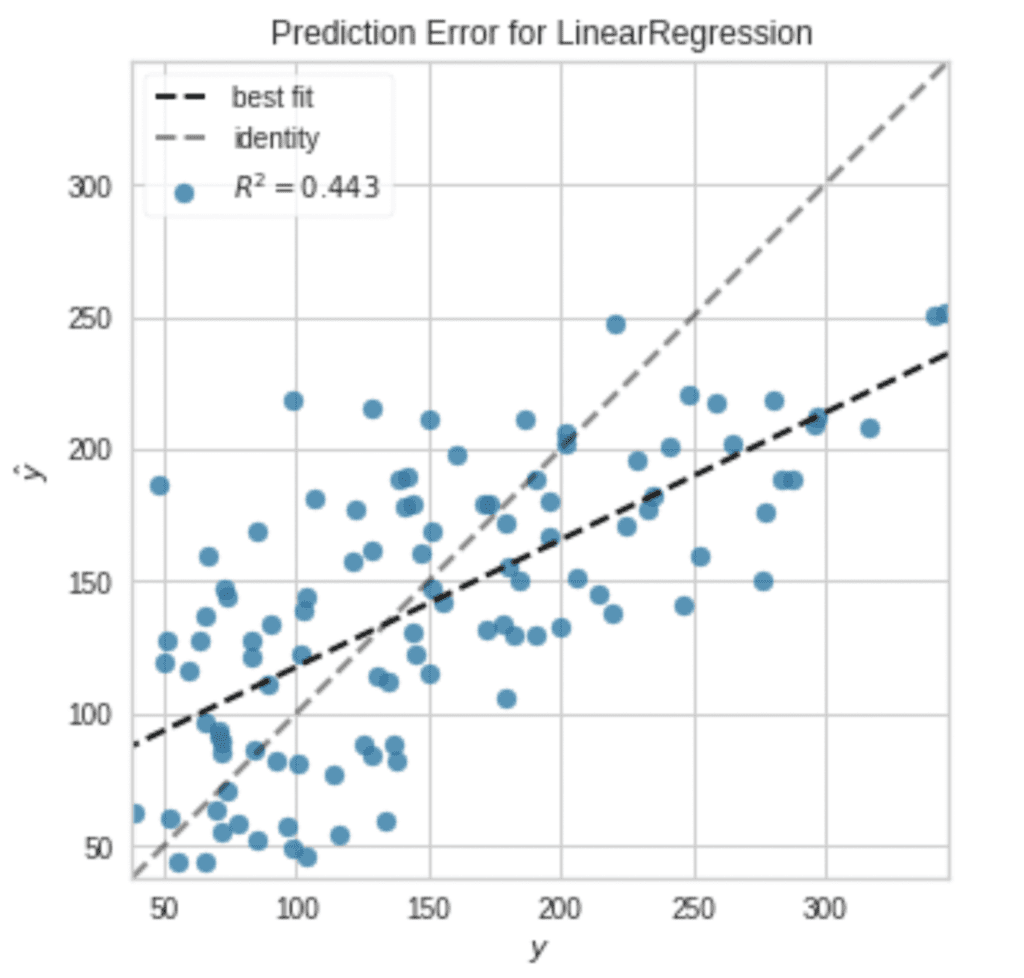
plot_model(tuned_model, plot = 'error')
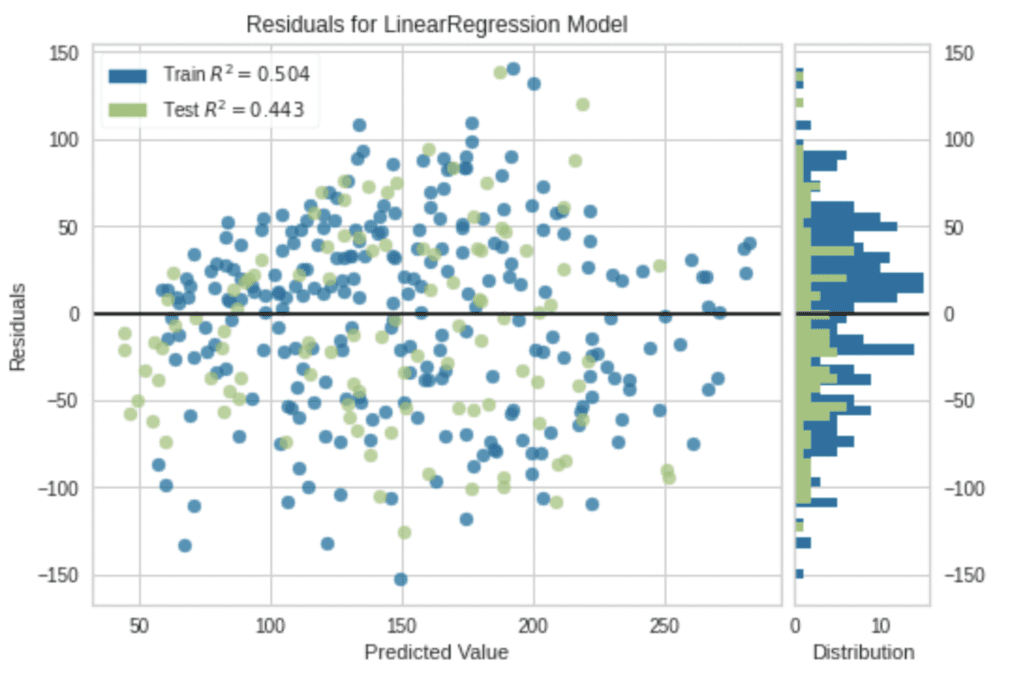
Note that, without an argument, a residual plot will be visualized.
plot_model(tuned_model)
Summary
We have seen the tutorial of PyCaret from the regression problem. PyCaret is so useful to perform the first analysis against the unknown dataset.
In data science, it is important to try various approaches and to repeat small trials quickly. Therefore, there might be worth using PyCaret to do such thing more efficiently.
The author hopes this blog helps readers a little.
PyCaret is a powerful tool to compare models between different machine learning methods. The biggest feature of this library is the low code library for machine learning in Python. PyCaret is a wrapper including the famous machine learning libraries, scikit-learn, LightGBM, Catboost, XGBoost, and more.
To create one model, you may write an amount of code. So, you can imagine how difficult it is to compare models between different methods. However, PyCaret makes it easy to compare models, making it possible to experiment efficiently.
In this post, we will see the tutorial of PyCaret with a regression analysis against the Boston house prices dataset. The author will explain with the step-by-step guide in mind!!
PyCaret can be easily installed by pip command as follows:
$pip install pycaret
If you want to define the version of PyCaret, you can use the following command.
$pip install pycaret==2.2.2
Import Library
To start, we import the following libraries.
##-- PyCaret
import pycaret
from pycaret.regression import *
##-- Pandas
import pandas as pd
from pandas import Series, DataFrame
##-- Scikit-learn
import sklearn
Dataset
In this article, we use “Boston house prices dataset” from scikit-learn library, pubished by the Carnegie Mellon University. This dataset is one of the famous open-source datasets for testing new models.
From scikit-learn library, you can easily load the dataset. For convenience, we convert the dataset into the pandas-dataframe type, fundamental data structures in pandas.
Before train the model, devide the dataset into train- and test- datasets. This is because we have to confirm whether the trained model has an ability to predict an unknown dataset. Here, we split the dataset into train and test datasets, as 8:2.
Set up the environment for PyCaret by the “setup()” function
Here, we set up the environment of the model by the “setup()” function. Arguments of the setup function are the input data, the name of the target data, and the “session_id”. The “session_id” equals to a random seed.
Conveniently, PyCaret will predict the data type for each column as above. “Numeric” indicates the data is continuous values. On the other hand, “Categorical” means the data is NOT continuous values, for example, the season(spring, summer, fall, winter).
This is a very convenient function for quick data analysis!
We have seen “CHAS” is NOT “Numeric”, where categorical data is NOT suitable for regression analysis. Then, we should drop the “CHAS” column from the dataset, and reset up the environment by the “setup()” function.
Note that, actually, “RAD” is also NOT continuous values. We can know this fact from the explanatory data analysis. You can check the details from the above link of another post, “Brief EDA for Boston House Prices Dataset“.
data = data.drop('CHAS', 1) # "1" indicate the columns.
model_reg = setup(data = data, target = "PRICES", session_id=99)

>>             Data Type
>>     CRIM      Numeric
>>       ZN      Numeric
>>    INDUS      Numeric
>>      NOX      Numeric
>>       RM      Numeric
>>      AGE      Numeric
>>      DIS      Numeric
>>      RAD      Numeric
>>      TAX      Numeric
>>  PTRATIO      Numeric
>>        B      Numeric
>>    LSTAT      Numeric
>>   PRICES        Label
Comparison Between All Models
PyCaret makes it possible to compare models easily with just one command as follows. We can compare the models by the evaluation metrics. Due to the smaller evaluation metrics(MAE, MSE, RMSE..), it turns out that superior solutions are based on decision tree-based methods.
compare_models()
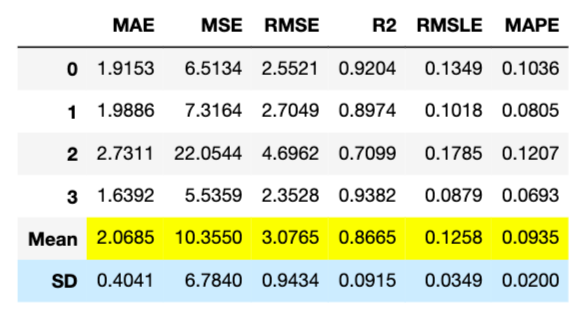
In this case, “CatBoost Regressor” is the best model. So, let’s construct the CatBoost-Regressor model. We use the “create_model” function and the argument of “catboost”. Another argument of “fold” is the number of cross-validation. In this case, we adopt “fold = 4”, then there are 4 (0~3) calculated results of each metric.
catboost = create_model("catboost", fold=4)
Optimize Hyperparameter by Tune Model Module
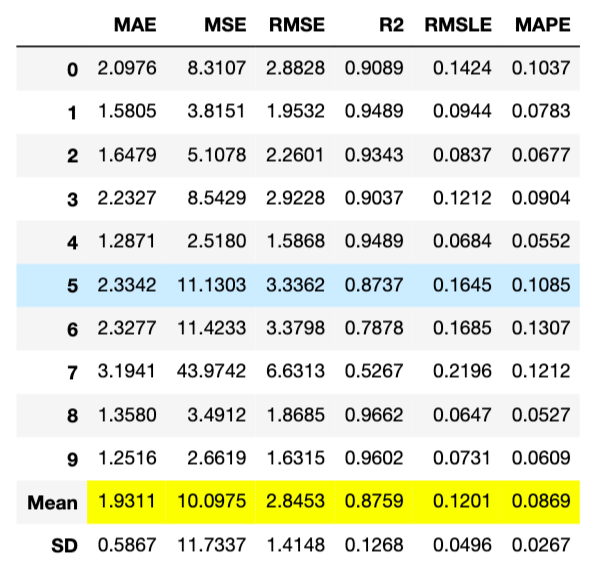
A tune-model module optimizes the created model by tuning the hyperparameters. You pass the created model to the tune-model function, “tune_model()”. An optimization is performed by a random grid search. After tuning, we can clearly see the improvement of MAE, 2.0685 to 1.9311.
tuned_model = tune_model(catboost)
Visualization
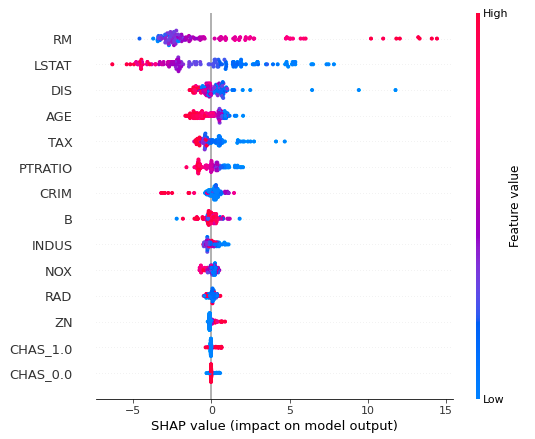
It is also possible to visualize results by PyCaret. First, we check the contributions of the features by the “interpret_model()” module. The vertical axis indicates the explanatory features. And, the horizontal axis indicates the SHAP, contributions of the features into output. Each circle shows the value for every sample. From this figure, we can clearly see RM and LSTA are the key features to predict house prices.
interpret_model(tuned_model)
Summary
We have seen the basic usage of PyCaret. Actually, PyCaret has various other functions, but the author has the impression that the functions are frequently renewed due to the high development speed.
The author’s recommended usage is to first check if there is a significant difference in accuracy between decision tree analysis and linear regression analysis. In general, decision tree-based methods tend to be more accurate than linear regression analysis. However, if you can expect some accuracy in the linear regression model, it is a good idea to try to understand the dataset from the linear regression analysis as the next step. This is because the model interpretability is higher in the linear regression analysis.
The essence of data science requires a deep understanding of datasets. To do so, it is important to repeat small trials quickly. PyCaret makes it possible to do such a thing more efficiently.
The author hopes this blog helps readers a little.